Make a request for patient using Cash?
Sparrow Health now lets patients conveniently pay for services using cash at the clinic. Simply select the cash payment option, choose your change preference, and complete the transaction at the clinic.
How to make a request using Cash?
-
Impersonate Patient's Profile: Log in to the Sparrow Health platform and "Impersonate" into the patient's profile.
-
Select a Service:
- Once signed into patient's profile, navigate to "Make a Request" menu, and Select a service.
- Fill out the necessary information to make a request, and Click next.
-
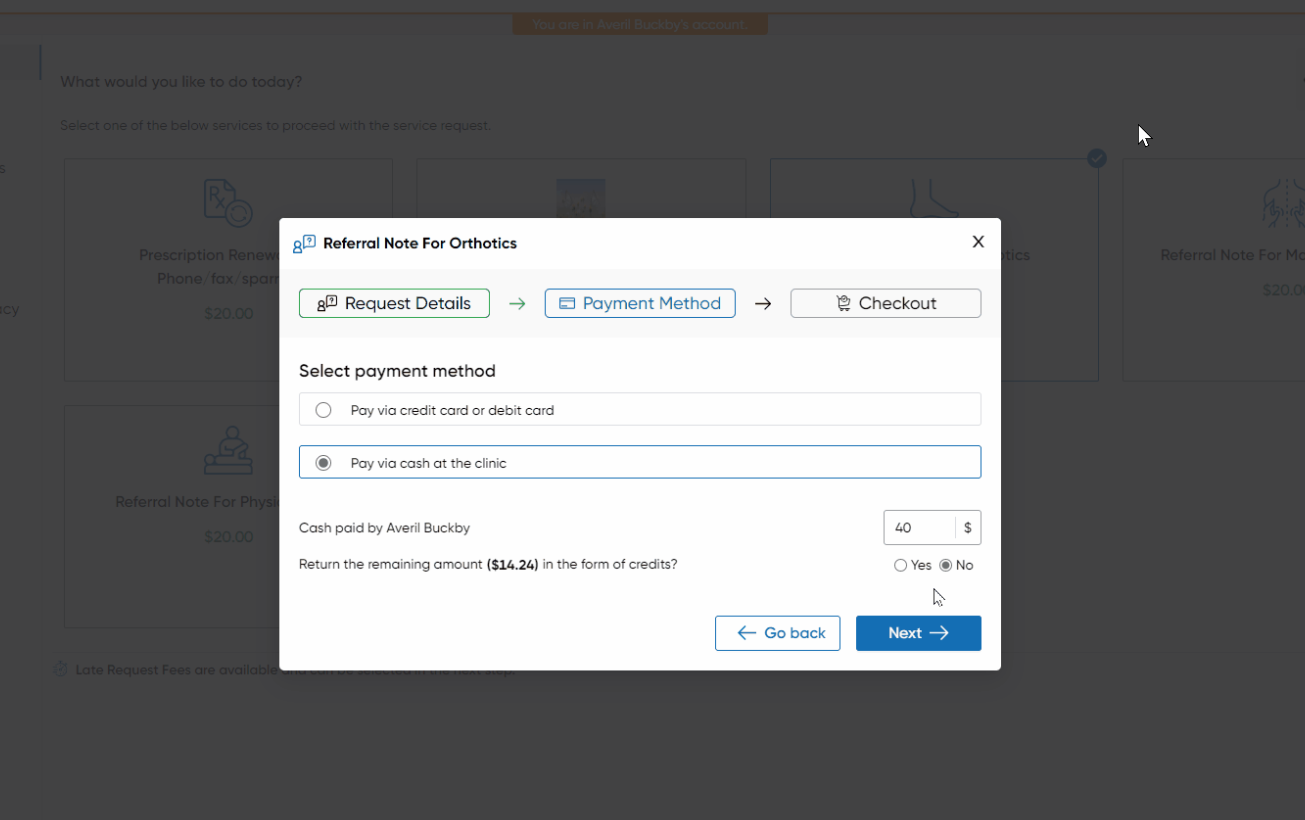
Select Payment Method:
- Select "Pay cash at the Clinic" option.
- The system suggests the next possible cash round-off amount, which you can adjust.
- Choose whether to return change as Sparrow Credits or provide it in cash.
- Please select one of either, and click Next.
-
Complete the Cash Transaction:
- Please review the transaction amount and collect the cash amount at the clinic.
- Once the transaction is completed, You can click on "Complete Request" button, and submit the request.
- Notification:
- We will send an email notification to the patient (if an email is on file) about the transaction, with an copy of receipt attached.